
Last updated October 27, 2026
Short answer: a timesheet is DCAA compliant when your timekeeping process records time daily, charges it to the right contract, gets employee certification and supervisor approval, and keeps a record of every change. DCAA does not certify software. It audits your practices. Use the 10 points below to check yours.
Auditors expect time to be entered daily, not reconstructed at the end of the week or pay period. Late entries are one of the most common findings.
How eTimesheets.com helps: daily timesheets on web or phone, with automatic reminders for anyone who hasn't entered time.
Employees should record all hours worked, including indirect time, leave, and unpaid overtime, not only billable hours. This keeps labor costs accurate across contracts.
How to meet it: set up charge codes for indirect work, overhead, and leave so employees always have a correct place to record time.
Each hour must go to the contract, task, or indirect account it was actually worked on. Charging time to the wrong contract is a serious audit finding.
How eTimesheets.com helps: charges can go up to 10 levels deep (client, contract, project, task, sub-task), so employees pick the exact code.
Limiting each employee to the contracts they actually work on prevents accidental or improper charging.
How to meet it: assign charge codes by employee or team, and remove codes when a contract or task closes.
At the end of each period, employees sign their timesheet to confirm it is accurate. An electronic signature works.
How eTimesheets.com helps: employees sign timesheets electronically before they move to approval.
A supervisor who knows the employee's work should review and approve each timesheet.
How eTimesheets.com helps: timesheets can be approved by up to three managers, then locked so they can't be changed without a record.
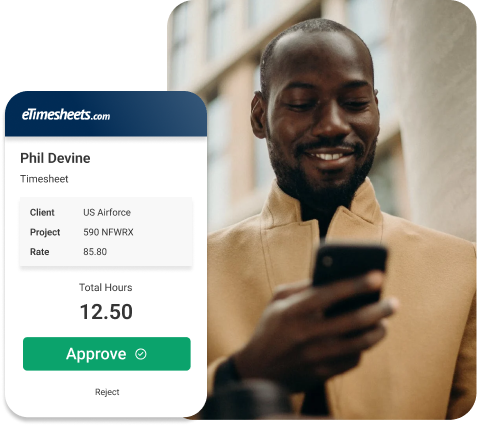
Supervisors review and approve timesheets from any device in eTimesheets.com.
Corrections are allowed, but each one needs a record of what changed, who changed it, when, and why. Undocumented changes are a red flag.
How eTimesheets.com helps: a full audit log captures every change to every timesheet.
Hours on approved timesheets should match the hours paid in payroll and the labor billed to each contract.
How eTimesheets.com helps: approved hours sync to QuickBooks, ADP, Gusto, and Paychex, and reports export to Excel or PDF for reconciliation.
Auditors ask for your written timekeeping policy and evidence that employees were trained on it. Software can't do this part for you.
How to meet it: write a short policy covering daily entry, all-hours recording, corrections, and approvals. Have every employee sign that they've read it, and refresh the training each year.
Keep timesheets, approvals, and change history for the full retention period your contracts require, and be able to pull them quickly when an auditor asks.
How eTimesheets.com helps: timesheets, approvals, and the audit log stay in one place, with reports you can run for any period.
Yes, in practice. Nonprofits with federal grants fall under Uniform Guidance (2 CFR 200), which requires time-and-effort records that reflect actual work. The same daily entry, approval, and change-tracking controls help pass a Single Audit.
eTimesheets.com vs Hour Timesheet: DCAA timekeeping compared
DCAA compliance for timekeeping: what contractors need
eTimesheets.com has provided DCAA-compliant timekeeping for small government contractors since 1999, for $10 per user per month. Start a free trial with no credit card required.
Start your free trial